
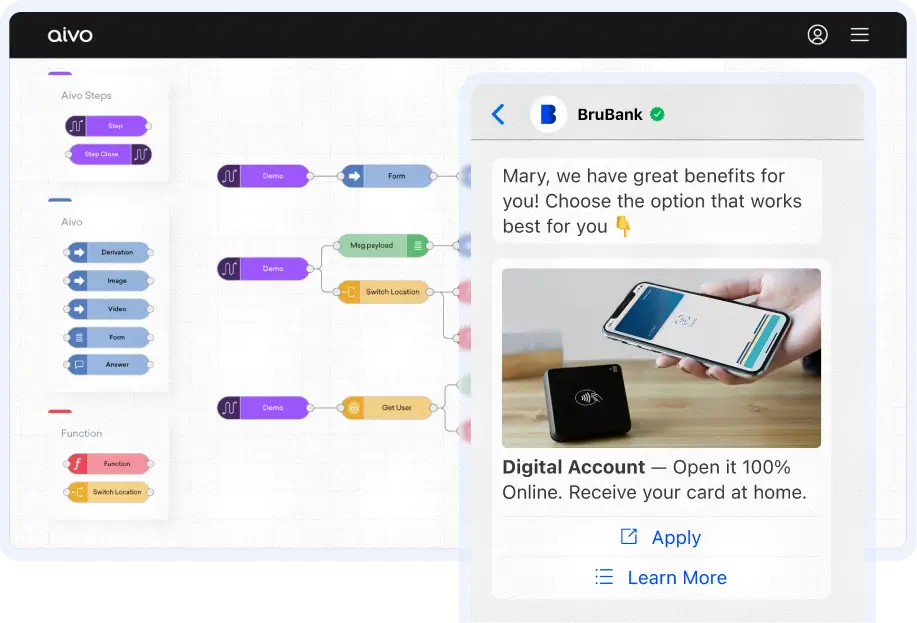


Proven examples for regulated industries
Connect Your Systems. Orchestrate Seamless Journeys. Stay Compliant.
Studio turns fragmented tech stacks into unified customer experiences. Connect core systems, build workflows, and automate safely with the integration layer built for regulated industries.
The Problem
Your Customers Don't Care About Your Systems.
They expect one seamless experience.
But your teams juggle a dozen disconnected systems per transaction.
50
%
Of customer journeys break down at integration points
8-12
Systems the average agent switches between per interaction
60
%
Of implementation time wasted on custom integration work
Aivo Studio
The integration layer built for regulated industries
Build compliant workflows without technical risk
Design compliant customer journeys using drag-and-drop workflows, embedded policy guardrails, and preconfigured templates for regulated use cases like account updates and payment processing.
Trace every action back to its source
Automatically capture full decision logs for every workflow step. Meet regulatory requirements with audit trails that show what happened, when it happened, and why, backed by built-in compliance reporting.
Connect safely to your core systems
Integrate with banking cores, CRMs, and payment platforms using an API-first architecture, sandbox testing, and parallel deployment that protects production systems during implementation.
From Integration to Impact
29
%
Reduction in operational costs
85
%
Credit flow completion rate
67
%
Faster processing

“Studio allowed us to develop version 2.0 of our bank’s virtual assistant and solve 80% of the most popular queries in a single chat. Our focus is integrating our services to achieve 100% resolution with the bot, avoiding transfers to other service channels.”
— Fabián Mealla, Digital Banking Manager

Single-conversation resolution
Your customers schedule appointments, complete transactions, and get answers in a single conversation—without handoffs.
Complete Ccntext for agents
Your agents have every data point they need at their fingertips, without alt-tabbing through twelve systems.
Unified experiences, zero disruption
Your business delivers unified experiences without replacing a single core system or disrupting operations.
Capabilities
Enterprise-grade integration architecture
API-first
We help you define success criteria for AI adoption and help you build use cases based on your organization, business goals, and data platforms.
Security & compliance
We help you define success criteria for AI adoption and help you build use cases based on your organization, business goals, and data platforms.
Scalability
We help you define success criteria for AI adoption and help you build use cases based on your organization, business goals, and data platforms.
Stop losing customers at integration points
See how Studio connects your tech stack, ensures compliance, and orchestrates seamless customer journeys without ripping your core systems.
FAQs
Frequently Asked Questions
Why should I use Studio?
Delivering instant solutions is fundamental to creating a true conversational experience for your customers. Transactional integrations with third-party platforms give them the information they need, whether it’s a support ticket, credit card balance, or mobile plan details. For those using Engageware’s AI-powered platform, Studio lets you develop custom workflows to connect the solution with APIs and web services, automating customer service and sales resolution autonomously.
What are the skills required to use Studio?
Studio is a low-code tool, so some programming knowledge is helpful for creating complex workflows. Recommended requirements include basic knowledge of flow layout and modeling, Javascript programming language (or ability to research and find solutions), Web Services and REST APIs, and familiarity with Engageware platform capabilities.
What are the infrastructure requirements?
There are no infrastructure requirements on your side. Studio is fully cloud-hosted and ready to use. To build integrations, you’ll simply need access to any REST or SOAP APIs from the systems you want Studio to connect to. These can be proprietary or third-party. Studio handles role-based access, encryption, and sandbox testing to ensure secure implementation.
Is Studio Self-Service?
Yes, you can use Studio to create integrations at your own pace and according to your own goals. However, if you need extra help, our team will be there to guide you through the process with workflow mapping sessions and implementation support.
How long does typical Studio implementation take?
Studio enables 60% faster deployment compared to traditional custom integration approaches. Most implementations move from workflow mapping to live, value-generating automations in hours, days or weeks, not months. The exact timeline depends on the complexity of your workflows and the number of systems being integrated.
Can Studio integrate with our legacy systems?
Yes. Studio’s API-first architecture connects to hundreds of enterprise systems, including legacy core banking platforms, CRMs, ERPs, and payment systems. We deploy in parallel without disrupting your live operations, so you can modernize your customer experience without ripping and replacing your existing infrastructure.